Outstanding Tiny Desk AI Template
Last updated:
This Tiny Desk AI template replaces the preset lead singer with the person in your photo, producing a roughly 11-second vertical MP4. Use TinyDesk.video in your browser without a template-file download. The CapCut comparison is below.
Nico’s full demo
New videos use the same fixed reference soundtrack as the Nico demo.
Three moments from the same demo
Follow the full video from the preset band to the recast lead’s close-up. These stills come from the single demo above, not three separate generations.
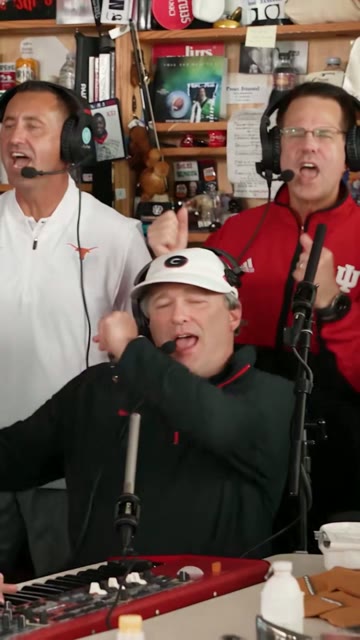
0.8 s · Preset band
The keyboard player and backing cast use the reference performance. Those roles are not individually selectable.
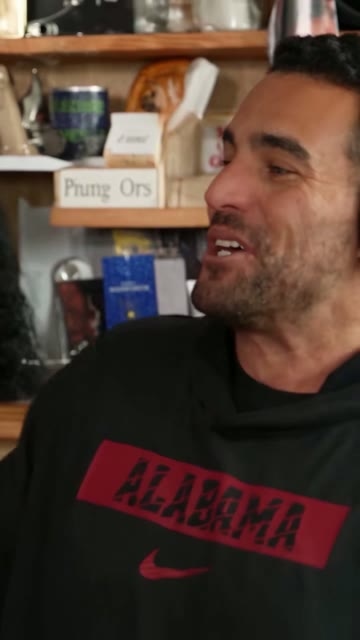
5.5 s · Lead close-up
The portrait supplies the lead’s facial identity. The black performance outfit and room come from the reference.
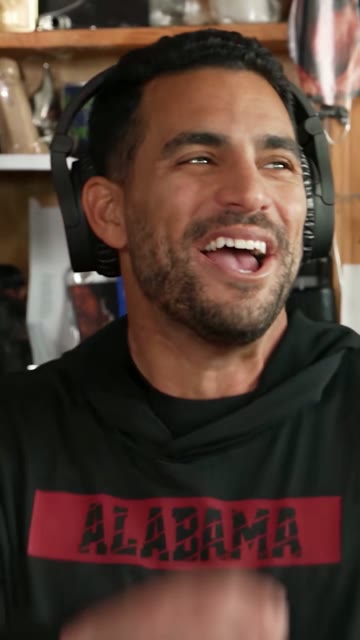
9.5 s · Expression and motion
Play the full clip to inspect the turn, smile, and mouth movement. Faces, hands, and performance details can vary with another photo.
What can I choose?
Choose the lead singer’s photo and 480p or 720p video quality. Each video is about 11 seconds in 9:16. Your photo replaces the red-cap lead’s face; the outfit, setting, and shots come from the preset reference.
The white-cap keyboard player and backing band cannot be individually cast. A three-video pack creates three separate single-lead videos. For individually cast band members, see the tool comparison.
What is in the approximately 11-second clip?
Use the complete Nico sample as the reference: the white-cap keyboard player and preset band are visible at 0.8 s, the lead’s profile at 5.5 s, and the smiling lead at 9.5 s. The three stills above locate moments in this one video, not three generations.
This edit does not include every shot in the full 19-second meme. You cannot add a saxophone solo or move a cut. Watch the complete reference and result to decide whether this range fits.
How is this different from a CapCut template?
TinyDesk.video: generate a new video from the preset performance without prompts or editing. The result is a 9:16 MP4, not a CapCut template project to import.
CapCut: choose a template to arrange your existing photos or clips with transitions, effects, and music. The required media and paid features depend on the template.
Use a lead-singer template to put yourself in the concert. Use an editing template to add captions, cuts, or a montage to footage you already have.
Choose a photo and get started
Choose a head-and-shoulders photo of yourself or a consenting adult. A clear, front-facing photo in even lighting works best for the singer’s close-up. Crop a group photo to the one person who will sing lead.
Open the creator in a phone or desktop browser, sign in with Google or email, then choose your photo and video quality. Follow the tutorial for upload, checkout return and starting the video.
How much does a video cost?
Watch the demo and read the guides for free. To make a video with your photo, buy a one-time pack starting at $9.90. The pricing page shows the video count, quality, and total.
Once payment is confirmed, you’ll return to the creation area. Click Create my video to start.
Your video’s sound and download
New videos automatically include the same fixed reference soundtrack as the Nico demo, taken from the preset reference performance. It is not newly generated singing or a clone of the photo subject’s voice. Generated mouth movements may vary. Custom songs, lyrics and voices are not supported; earlier results are not changed.
Make it a birthday surprise or group-chat moment
Put a consenting adult birthday guest in the spotlight, give a friend or coworker a send-off, or celebrate your own milestone.
These ideas use the same solo performance. Add your greeting or inside joke to the message or caption when you share it.
Need a hand?
If the first completed video on your account won't play, has severely corrupted video, replaces the wrong person, or has a severely distorted or unrecognizable face, email support@tinydesk.video within 7 days of receiving it. Include your video ID and a description for support to review. If we verify that the issue is covered, you can choose a free retry or a refund for that video to your original payment method.
Product sources and revision history
2026-11-01: reused the existing Nico case and file record to align fixed reference audio, roughly 11-second shot coverage and single-lead scope. No new paid generation, portrait test or success-rate claim was added.
Product terms come from our home page, pricing and refund policy. Media credits and sample limits are on the case-study page; external claims retain their linked official sources.